
Dub videos into other languages without giving up control.

Trackdub is a desktop workstation for translating, voicing, and mixing video. Every stage of the pipeline is inspectable, editable, and rerunnable, from the transcript to the final mix. Your media never leaves your machine unless you say so.

01
The pipeline

A clear, inspectable path from source media to final mix. Nothing is hidden.

Built for control at every stage.

Review every line. Tweak every take. Rerun only what changed. You are always in control.

Platforms
Windows · macOS · Linux
Acceleration
TensorRT RTX · CUDA · DirectML · CoreML · MIGraphX · OpenVINO · QNN · CPU
Data
Local by default · cloud providers opt in per stage

Six stages. Each one editable, each one rerunnable.

A dubbed video is not a single button. It's a chain of decisions: what someone said, what it should say in the target language, whose voice says it, and how it sits in the mix. Trackdub exposes that chain, so you can inspect any link and change it in place.

Every stage declares what it needs from the previous one. If you edit the transcript, the translation knows to invalidate. If you change a speaker's voice reference, only their lines regenerate. Nothing rebuilds that doesn't have to.

  1. 01
    Ingest
    Probe media. Detect scenes, silence, and speech.
    Read →
  2. 02
    Transcribe
    Time-accurate source transcript with speaker turns.
    Read →
  3. 03
    Translate
    Human-editable target script, tied to timecode.
    Read →
  4. 04
    Diarize
    Assign speakers. Attach a voice reference to each one.
    Read →
  5. 05
    Voice
    Zero-shot TTS. Regenerate any single line.
    Read →
  6. 06
    Mix
    Align, duck under music, mux the final file.
    Read →
Chapter
01aThe workstation

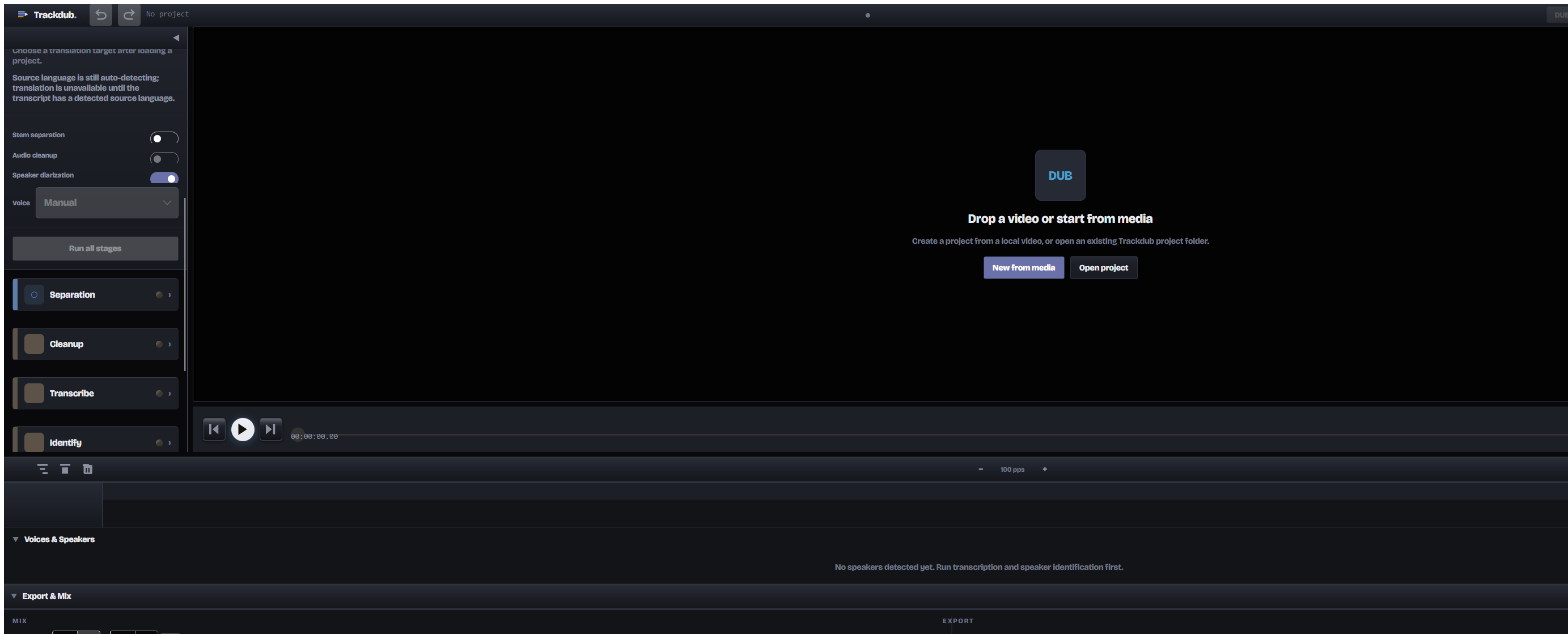
The interface is being built around the pipeline itself: source media, editable stages, and the exact state of every run in one place.

Trackdub desktop app shell, early build: pipeline stage list with separation, cleanup, transcribe, and identify stages, stem separation and speaker diarization toggles, voice selector

Fig. 02  ·  Actual desktop shell, early build. Pre-release UI; chrome and copy are still moving.

Local by default. Deterministic runs. Cross-platform. Open manifest. No account required. Per-line regen. Resumable jobs. CPU fallback, always. Your disk, your files.

Chapter
02Try the pipeline

Edit a line. Watch what invalidates.

A sample project, running in your browser. Change the transcript, retarget a translation, rename a speaker, or regenerate a single voice line. Downstream stages mark themselves stale; nothing else is touched.

  • 01   Ingestclean
  • 02   Transcribeclean
  • 03   Translateclean
  • 04   Diarizeclean
  • 05   Voiceclean
Source transcript · de-DE · click a line to edit
00:38.120AnnaWir haben die Pipeline neu gebaut,
00:42.180Annadamit jede Stufe editierbar bleibt.
00:46.900MateoUnd wenn etwas nicht stimmt …
00:49.640Mateoänderst du nur die eine Zeile.
Tip: change a word, then switch to Translate; that line will be marked stale, the rest stay.

Fig. 02  ·  Interactive sample  ·  runs in this page, nothing uploaded

Chapter
02bResumable jobs

Pause anything. Edit one stage. Resume only what changed.

Every stage writes a checkpoint to disk. Close the app, unplug the laptop, edit a translation two days later, and the job picks up from the last completed artifact.

When you change a translated line, Trackdub marks that stage and everything downstream as stale and requeues only those. Ingest, transcription, and diarization stay done; they don't depend on the edit.

Try it → pause · edit translation · resume

Job · interview_de.mp4 → en-US  ·  checkpoint dir: /projects/interview/.trackdub
Simulate failure
  1. 01Ingest & probe
    done
  2. 02Transcribe (ASR)
    done
  3. 03Translate
    35%
  4. 04Diarize
    queued
  5. 05Voice (TTS)
    queued
  6. 06Mix & mux
    queued
Job log · streaming
00:00Job queued · interview_de.mp4 → en-US
00:02Ingest complete · media.probe.json
00:09Transcribe complete · 128 segments
00:09Translate started · model=nllb-1.3b

Fig. 02b  ·  Simulated job runner with failure injection. Progress, errors, and log are client-side only.

Chapter
03Each stage, in detail

Open the hood on any stage.

01Ingest

Probe media. Detect scenes, silence, and speech.

Point Trackdub at a file or folder. It reads the container, extracts audio, detects shot boundaries, and runs voice activity, building the frame every later stage will work against.

  • ·ffprobe media
  • ·shot / silence detection
  • ·loudness reference (LUFS)
Trackdub · ingest01 of 06
Media probe
containermp4 / h264 / aac
duration00:03:18.240
fps23.976
audiostereo · 48 kHz
scenes42 detected
speech84% (VAD)
loudness−14.1 LUFS

Fig. 02  ·  Ingest view

02Transcribe

Time-accurate source transcript with speaker turns.

Source-language ASR with word-level timestamps. The transcript is a real editable document, not an opaque intermediate. Fix a word here and every downstream stage picks it up.

  • ·word timestamps
  • ·editable transcript
  • ·diarization-ready turns
Trackdub · transcribe02 of 06
Source transcript · de-DE
00:38.120Wir haben die Pipeline neu gebaut,
00:42.180damit jede Stufe editierbar bleibt.
00:46.900Und wenn etwas nicht stimmt

Fig. 03  ·  Transcribe view

03Translate

Human-editable target script, tied to timecode.

Translation happens per line, not per file. Idioms, names, and jargon go in a project glossary; the target script preserves the source's timing so later stages can align to it.

  • ·per-line MT
  • ·project glossary
  • ·timecode preserved
Trackdub · translate03 of 06
Source · de-DETarget · en-US
Wir haben die Pipeline neu gebaut,We rebuilt the pipeline
damit jede Stufe editierbar bleibt.so every stage stays editable.
Und wenn etwas nicht stimmt …And if something's off …
Glossary · 12 terms locked

Fig. 04  ·  Translate view

04Diarize

Assign speakers. Attach a voice reference to each one.

Trackdub clusters voices, then lets you name them, merge them, or split them. Each speaker gets a short reference clip that the voicing stage will match: one clone per person, not one voice for the whole video.

  • ·speaker clustering
  • ·manual merge / split
  • ·voice reference per speaker
Trackdub · diarize04 of 06
Speakers detected
Anna
24 turns · 4.2s reference
Rename · Merge
Mateo
18 turns · 4.2s reference
Rename · Merge
Speaker 3
2 turns · 4.2s reference
Rename · Merge

Fig. 05  ·  Diarize view

05Voice

Zero-shot TTS. Regenerate any single line.

Per-speaker voice cloning generates each line at its target duration. Prosody is editable (pace, emphasis, pause), and any line can be regenerated on its own without redoing the rest.

  • ·per-speaker cloning
  • ·per-line prosody
  • ·regen line 42 in isolation
Trackdub · voice05 of 06
Line 42 · Annaduration 3.14s / target 3.20s
"so every stage stays editable."
Pace
0.98×
Emphasis
editable
Pause after
220 ms
[ Regenerate line ]   [ Regenerate speaker ]

Fig. 06  ·  Voice view

06Mix

Align, duck under music, mux the final file.

Dubbed lines snap to the original beats. Music and SFX from the source are preserved and ducked under dialogue. Export a muxed video, stems, or captions, deterministic given the same project manifest.

  • ·timeline alignment
  • ·music / SFX ducking
  • ·video + stems + captions
Trackdub · mix06 of 06
Timeline
Dialogue EN
Music
SFX
Loudness
−16 LUFS
Duck
−9 dB
Export
mp4 + stems

Fig. 07  ·  Mix view

Chapter
03bYou can fix anything, and only that thing

You changed one line. Only one line regenerates.

Change it. The translation invalidates. The affected voice line queues for a regen. Every other line stays exactly as it was: same take, same timing, same mix. That's the whole idea.

Before edit00:42.180
"so every stage stays editable."
Auto-generated · pace 1.00× · pause 200 ms
After text + prosody edit00:42.180
"so every stage remains editable."
Regen · pace 0.94× · pause 320 ms · this line only
Chapter
04Performance

Runs on the hardware you already have.

Trackdub can select TensorRT RTX, CUDA, DirectML, CoreML, MIGraphX, OpenVINO, QNN, or CPU per stage. Pick a policy or let it choose automatically. The tiers below are directional; measured benchmarks publish via DubBench ahead of v1 launch.

  1. TensorRT RTXWindows · RTX 30/40/50Fastest supported tier

    Selected when the model and RTX runtime are compatible

  2. CUDAWindows / Linux · NVIDIAFast

    NVIDIA fallback when TensorRT RTX is unavailable

  3. CoreMLmacOS · Apple SiliconFast

    Uses Apple Neural Engine and GPU where supported

  4. MIGraphXWindows 11 · AMDAccelerated

    Catalog-delivered AMD GPU lane for compatible ONNX graphs

  5. OpenVINOWindows 11 · IntelAccelerated

    Catalog-delivered Intel CPU, GPU, and NPU lane

  6. QNNWindows ARM64 · SnapdragonAccelerated

    Qualcomm NPU/GPU lane on compatible devices

  7. DirectMLWindows · any DX12 GPUBroad coverage

    Intel, AMD, and NVIDIA DirectX 12 hardware

  8. CPU (ONNX Runtime)All platformsPortable baseline

    Always available as the per-stage fallback. The ladder always lands somewhere.

Fig. 05  ·  Per-stage fallback ladder, fastest to most portable. Order, not measured throughput; benchmarks publish via DubBench ahead of v1.

Chapter
05Local-first, drawn as a map

Your media is yours. Here is the whole map.

Every stage runs on your machine by default. A cloud provider is something you plug in per stage, never a place your media silently ends up.

Your machine
IngestTranscribeTranslateDiarizeVoiceMixExport
Stays on this side of the line
  • Source media
    Never uploaded. Decode, analysis, and export are local.
  • Transcripts & translations
    Editable local files, plus glossary and speaker maps.
  • Voice references
    Per-project only. Never used to train a shared model.
  • Generated audio & stems
    Written to the output folder you choose.
  • Project files
    SQLite state and manifests, in a folder you control.
  • Model cache
    ONNX models and engine caches. Clearable in Preferences.
Across the line · opt-in only
  • Cloud translation

    Source text for the lines you route to a hosted provider.

    Off by default · per project, per stage

  • Cloud voice generation

    Target text and optional speaker reference for hosted TTS.

    Off by default · per project, per stage

  • Telemetry

    Anonymous crash reports and usage counters.

    Disabled on install

  • Update checks

    App version and OS info only. No media, no project data.

    On launch · can be disabled

Fig. 06  ·  The default data plane. Nothing crosses the dashed line unless you route it there, one stage at a time.

Pick your trim level.

Tbl. 03  ·  System requirements
Trim 01 · CPU-only or cloud-routed
Bare minimum

Slow is fine. Stuck is not.

OS
Windows 10 Enterprise LTSC 2021 (build 19044), or Windows 11
CPU
Any 64-bit x64 or ARM64
GPU
None. CPU inference, or route the heavy stages to a cloud provider
RAM
16 GB · 8 GB workable when heavy stages are cloud-routed
VRAM
none needed
Storage
10 GB for app + bundled models
Trim 02 · The daily driver
Recommended

Comfortable for 1080p projects.

OS
Windows 11 24H2 (build 26100)
CPU
Modern 8-core x64, or Snapdragon X-class ARM64
GPU
RTX 3060 / 4060 class, or any DirectX 12 GPU via DirectML
RAM
32 GB
VRAM
8 GB
Storage
SSD · 50 GB free for model + engine cache
Trim 03 · The studio rig
Premium

4K, long-form, many speakers, no waiting.

OS
Windows 11 24H2 (build 26100)
CPU
12 cores or better
GPU
RTX 4080 / 5080 class, TensorRT RTX lane
RAM
64 GB
VRAM
16 GB+
Storage
NVMe SSD · 100 GB free
Other platforms · provisional until those builds ship
macOS
macOS 14 Sonoma or later. Apple Silicon recommended; the CoreML lane uses the Neural Engine; Intel Macs run the CPU lane.
Linux
Ubuntu 22.04+ / Debian 12+ or equivalent glibc distro, x64 or arm64. NVIDIA CUDA for acceleration; CPU otherwise.

No accelerator required; every stage has a CPU fallback. HDD works; it just makes you wait.

Tbl. 02  ·  What's stored locally, and for how long
DataWhat it isRetention
Project filesSQLite project state, manifests, and stage snapshots.Kept in the project folder you choose. Deleted when you delete the project.
Source mediaOriginal video/audio, proxies, and extracted stems.Never uploaded. You choose the folder and can wipe it at any time.
Transcripts & translationsEditable script documents, glossaries, and speaker mappings.Stored as local files. No cloud sync unless you configure it.
Voice referencesShort speaker clips used for voice cloning.Stay on disk. Never used to train a shared model.
Generated audioPer-line TTS output, mix stems, and exported deliverables.Written to your project output folder. You own and control them.
Model cacheDownloaded ONNX models and compiled engine caches.Stored in the app data directory. Can be cleared in Preferences.
Tbl. 04  ·  Acceleration lanes, in detail
TensorRT RTX
Requirement
Windows or Linux · NVIDIA RTX 30 / 40 / 50 series
Speedup
Fastest on supported hardware
Caveat
Requires a compatible model, driver, and installed provider bundle. First run can compile an engine cache.
CUDA
Requirement
Linux or advanced Windows setup · NVIDIA GPU
Speedup
Fast general NVIDIA lane
Caveat
Used when the matching native ONNX Runtime and CUDA dependencies are available.
CoreML
Requirement
macOS · Apple Silicon
Speedup
Apple Neural Engine + GPU
Caveat
Model compatibility determines whether a stage stays on CoreML or falls back to CPU.
MIGraphX
Requirement
Windows 11 24H2+ · supported AMD GPU
Speedup
AMD catalog acceleration
Caveat
Installed through the Windows ML provider catalog; availability is model and device dependent.
OpenVINO
Requirement
Windows 11 24H2+ · supported Intel CPU, GPU, or NPU
Speedup
Intel catalog acceleration
Caveat
Installed through the Windows ML provider catalog and used only for compatible stages.
QNN
Requirement
Windows ARM64 · compatible Snapdragon device
Speedup
Qualcomm NPU/GPU acceleration
Caveat
Catalog availability and model support determine whether a stage can use the QNN lane.
DirectML
Requirement
Windows · any DirectX 12 GPU · 4 GB+ VRAM
Speedup
Broadest Windows GPU coverage
Caveat
Legacy-compatible fallback for Intel, AMD, and NVIDIA hardware; model support varies by stage.
CPU fallback
Requirement
Windows, macOS, or Linux · x64 or ARM64
Speedup
Portable baseline
Caveat
Always available. No accelerator is required to complete a project.
Chapter
06The manifest

A workstation, not a wrapper around a model.

Trackdub declares every bundled model in a manifest: source, checksum, license lane. Here's the same idea applied to the product itself: everything in the box, itemized.

Trackdub · shipping manifestItems: 12 · Rev. early preview
  1. 01
    Local by default
    Media, transcripts, voice references, and generated audio stay on your disk. Cloud is opt-in per project, per stage.
  2. 02
    Deterministic runs
    Same project manifest + same models = same output. Every stage records what it consumed.
  3. 03
    Resumable jobs
    Kill the app mid-run. Reopen the project. Continue from the last completed stage.
  4. 04
    Per-line regen
    Regenerate one voice line, one speaker, or one stage. Never a full-project redo for a small fix.
  5. 05
    Editable script
    Transcript and translation are real documents with a glossary, not opaque intermediates.
  6. 06
    Voice cloning per speaker
    One short reference per speaker. No shared 'AI voice' for the whole video.
  7. 07
    Source separation
    Vocal and instrumental stems are split out, kept, and ducked under dialogue automatically. Or manually, if you prefer.
  8. 08
    Lip sync
    Optional viseme-matched lip sync for on-camera speakers. Off by default, gated by license lane.
  9. 09
    Open model manifest
    Every bundled model, its license lane, and its checksum is declared in one JSON file.
  10. 10
    CLI and SDK
    The same pipeline the app runs is scriptable for batch, CI, or on-prem automation.
  11. 11
    Cross-platform
    Windows, macOS, Linux. Same project format. Same output.
  12. 12
    Open-core engine
    Domain, application, inference, SDK, and CLI ship Apache 2.0. The desktop app and licensing layer are source-visible.
Models declared in bundled-models.manifest.json · source · checksum · license laneNothing research-only ships as a default
Chapter
07Compared to

Trackdub, next to how dubbing usually gets done.

TrackdubDescriptElevenLabs DubbingDIY (Whisper + TTS + DAW)
Runs locallyYesNoNoYes
Editable transcriptYesYesYes, in Dubbing StudioYes
Per-line / per-clip regenYesComposition-levelYes, in Dubbing StudioManual
Speaker-aware voicingYesYes, manual speaker→voice mapYes, clip or track voice cloneManual
Deterministic runsYesNot publishedNot publishedNo
Resumable jobsYesNot publishedNot publishedNo
Programmatic accessCLI + SDKNot publishedAPI, enterprise waitlistN/A
No account requiredYesNoNoN/A

Descript and ElevenLabs Dubbing feature sets per each vendor's public docs, checked July 2026. Feature sets change; verify current before deciding.

Chapter
08Pricing

Three ways to run it. All of them local-first.

  • Personal

    Free

    Commercial use allowed

    • Full desktop app, every pipeline stage
    • All languages and bundled models
    • CLI access included
    • Exports watermarked, 5-minute max
  • Pro

    Recommended
    $149

    One-time purchase · 2 machine activations

    • Everything in Personal
    • No watermark, no duration limit
    • Commercial use license
    • Lifetime updates within v1.x
  • Studio

    In development

    Post-launch · not sold yet

    • Batch and multi-GPU processing
    • 4K-optimized export pipeline
    • Commercial redistribution rights
    • Ships after Pro, once real

Full pricing, license terms, and FAQ →

Chapter
09Questions

Straight answers.

Not covered here? Write to hello@trackdub.com.

Data handling questions are covered in full in the privacy policy.

Does my video get uploaded anywhere?
No. Trackdub runs the whole pipeline on your machine by default. Cloud endpoints exist for teams that want them, but they're opt-in per project and per stage, never implicit.
What happens to my data if I uninstall?
Your projects, source media, and generated output live in folders you chose, so they stay where they are until you delete them. The app data directory (model cache, preferences, and logs) can be removed during uninstall or manually from %LOCALAPPDATA%\Trackdub.
Can I use it commercially?
Yes, on every tier, including Free. Free exports carry a small watermark and cap at 5 minutes; Pro removes both. Every bundled model is commercial-safe by manifest, so nothing research-only ever loads.
How is the voice cloning handled?
Each detected speaker gets one short reference clip you can review or replace. The voicing stage uses that reference: one voice per person, not one 'AI voice' for the whole video. References stay on your disk.
What if the ASR gets a word wrong?
Fix it in the transcript. The translation for that line invalidates, the voicing for that line queues for a regen, and nothing else rebuilds. Every stage declares its inputs, so edits propagate exactly as far as they need to.
Do I need a GPU?
No. CPU execution is the portable baseline. Compatible hardware can use TensorRT RTX, CUDA, DirectML, CoreML, MIGraphX, OpenVINO, or QNN per stage, with automatic fallback when a provider or model combination is unavailable.
Can I automate it?
Yes. The CLI ships in every tier, Free included. The same pipeline the app runs is scriptable for batch localization, CI, or an on-prem REST worker via the SDK.
Can the whole pipeline run offline?
Yes. Once the models you selected are downloaded, every bundled stage can run without an internet connection. Hosted translation or voice providers are optional and configured one stage at a time.
Can I choose which accelerator Trackdub uses?
Yes. Automatic mode selects the best compatible provider per stage, while an execution policy lets you prefer or exclude providers. A stage can fall back without changing the rest of the project.
What operating systems are supported?
Trackdub targets Windows, macOS, and Linux with the same project format. Available acceleration providers differ by operating system and hardware, but CPU execution remains the portable fallback.
Can I use a cloud provider for only one stage?
Yes. You can route translation or voice generation to a provider you configure while keeping ingest, transcription, timing, mixing, and the rest of the project local.
How are model licenses handled?
Every bundled model is declared in the model manifest with its source, checksum, and commercial-use lane. Unknown or research-only licenses are not treated as safe bundled defaults.
Chapter
10End

Dub this in Spanish. Keep the original music. Regenerate line 42 with slower prosody. Ship it before lunch.

Interested in Trackdub? Join the launch list and be the first to know when downloads, release notes, and preview invitations are ready.

Evaluating Trackdub for a program, fund, or partnership? press@trackdub.com · building in public: read the changelog